Equalizer
Coming SoonAOS EQ
Shape your sound. Not your budget.
A versatile equalizer built for producers, musicians, editors, and creators who need a clean, practical tone-shaping tool.
Coming Soon • Free release 2026 • Free when it ships, no subscription
Overview
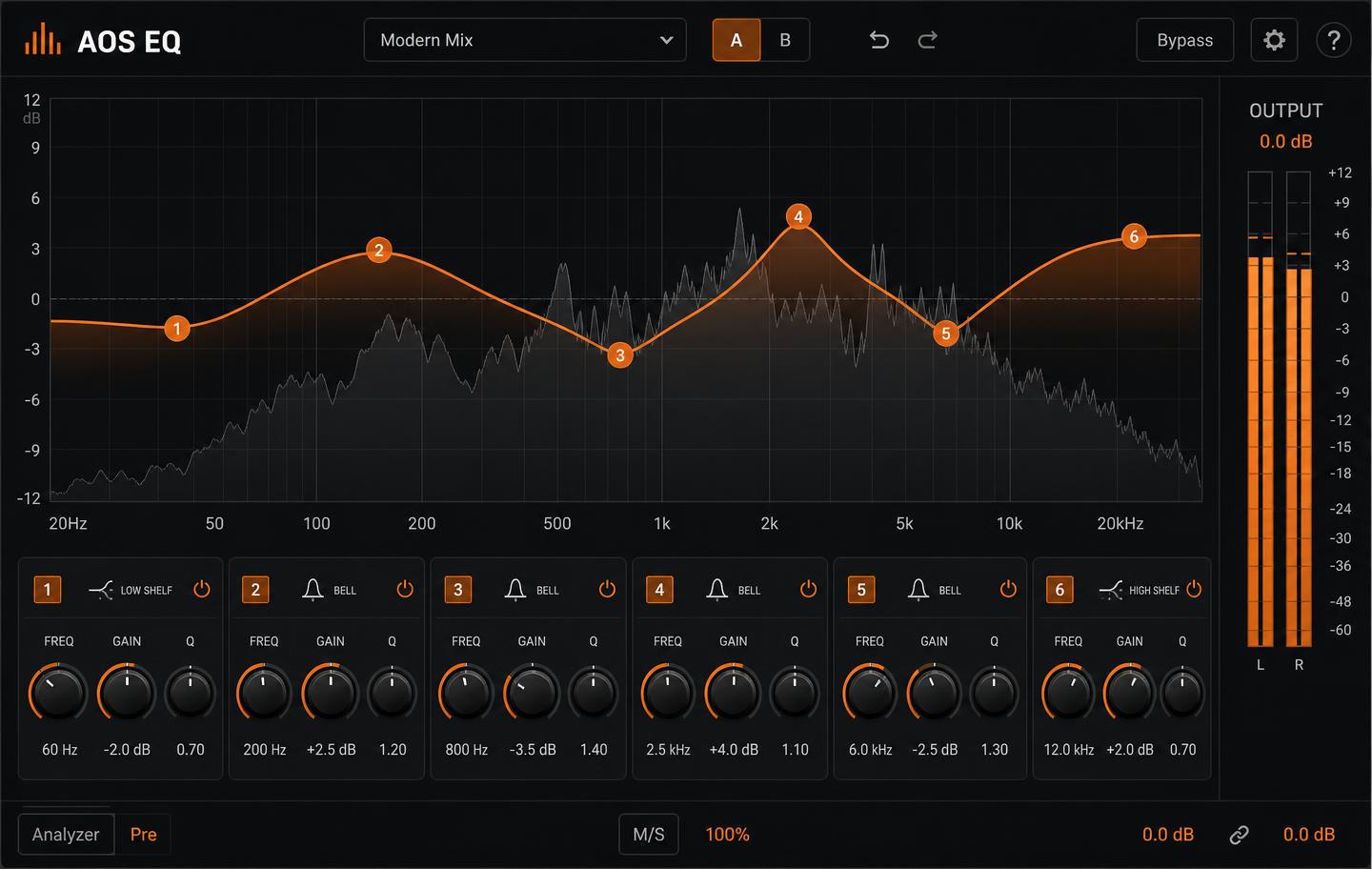
AOS EQ is a six-band parametric equalizer with a real-time analyzer, musical filter shapes, and a workflow that stays out of the way. It was built because tone shaping is the first thing every creator needs and the last thing that should cost money.
Features
- Six fully parametric bands with bell, shelf, and cut shapes
- Real-time spectrum analyzer with pre/post comparison
- Stereo, mid/side, and per-channel processing
- Minimum and linear phase modes
- A/B compare, undo history, and preset browser
- Resizable, high-contrast, accessible interface
Installation
- 1Download the zip for your platform and format, then extract it.
- 2Drag the extracted plugin file into the correct folder for your DAW format.
- 3macOS AU: place the .component file in ~/Library/Audio/Plug-Ins/Components/
- 4macOS VST3: place the .vst3 file in ~/Library/Audio/Plug-Ins/VST3/
- 5Windows VST3: place the .vst3 file in C:\Program Files\Common Files\VST3\
- 6Restart your DAW and rescan plugins if needed.
- 7Find AOS EQ under the All Our Sound manufacturer folder.
How to use
- Start with subtractive moves: cut what's cluttering before boosting.
- Use the analyzer to confirm what you hear, not to replace it.
- Engage the high-pass on non-bass sources to clear low-end build-up.
- A/B every change at matched loudness before committing.
Free course
EQ & Tone Shaping
A free AOS Academy course that teaches frequency ranges, filter types, and practical mixing decisions using AOS EQ.
Documentation
Release notes
v1.0 · Initial release
- Six-band parametric engine
- Spectrum analyzer with pre/post
- Preset browser and A/B compare
License
Free for personal and commercial use. Redistribution of the installer is allowed with attribution. No subscription, no account, no telemetry.
Support / report a bug
Support
Help keep creative tools free.
AOS resources are made possible through grants, sponsors, and people who believe creators deserve access to professional tools and knowledge. Free access still requires paid work: artist fees, development, hosting, documentation, and music production.
Your support helps fund development, testing, documentation, music production, education, and distribution.